


1. Overview
This article provides instructions on how to upgrade your account to the Premium plan in the MISA MoneyKeeper app to unlock all premium benefits, such as removing ads, enjoying unlimited access to advanced features, and receiving priority customer support.
The overview includes:
- Bank transfer payment instructions
- Payment via App Store (iOS)
- Payment via Google Play (Android)

2. Definition
Definition: Premium Upgrade is a feature that allows users to purchase a paid plan in the MISA MoneyKeeper app to unlock all premium benefits, such as removing ads, unlimited use of advanced features like creating wallet accounts and importing bank statements, and priority customer support.
Users can upgrade to Premium through multiple payment methods, including bank transfer, App Store payment on iOS, or Google Play payment on Android, with monthly, yearly, or lifetime plans depending on their usage needs.
3. Steps to Upgrade
3.1. Upgrade Premium via Bank Transfer
Step 1: Open your banking app.
Step 2: Transfer to the following account:
“ACB – Ha Thanh Branch – 566778888 – MISA JOINT STOCK COMPANY”
Step 3: Enter the amount corresponding to the plan you want to purchase:
- 25,000 VND/month
- 199,000 VND/year
- 599,000 VND/lifetime
Step 4: Enter the transfer description using the following format:
“CKSTC [sharing code]”
Step 5: Confirm the transfer and wait for the system to process it within 24 hours.
3.2. Upgrade Directly in the App
Step 1: Open the MISA MoneyKeeper app.
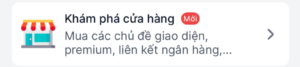
Step 2: Select “Explore Store” in the “More” tab.
Step 3: Choose the appropriate “Premium Upgrade” plan.
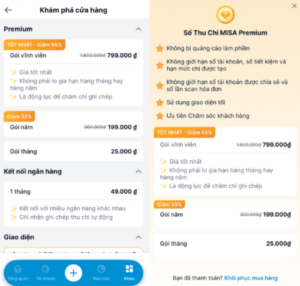
Step 4: Complete the process according to the selected payment method.
For iOS:
Confirm payment using Face ID or Touch ID via the App Store.
For Android:
Choose a payment method via MoMo, ZaloPay, Card, or Google Pay.
Step 5: Wait for the system to confirm and automatically upgrade your account.
4. Notes
- If paying by bank transfer, make sure you enter the correct transfer description: “CKSTC [sharing code]”.
The sharing code is a unique identifier for each account and can be found in the Personal Information section of the app. - Monthly and yearly plans purchased through the App Store or Google Play will be automatically renewed according to Apple and Google policies.
- If you do not want automatic renewal, you need to manually cancel the subscription in the App Store or Google Play settings before the renewal date.