Skip to content
MISA Help MoneyKeeperMISA Help MoneyKeeper
  • Bắt đầu sử dụng
  • Hướng dẫn sử dụng
  • Câu hỏi thường gặp
  • English
    • English
    • Tiếng Việt
Account management

Transfer

Posted on 27/05/202004/06/2020 by Anh Tuan Nguyen
Post Views: 1,294

When customers want to transfer money between 2 accounts, for example, transferring from Cash Wallet account to ATM Card can use the Transfer feature.

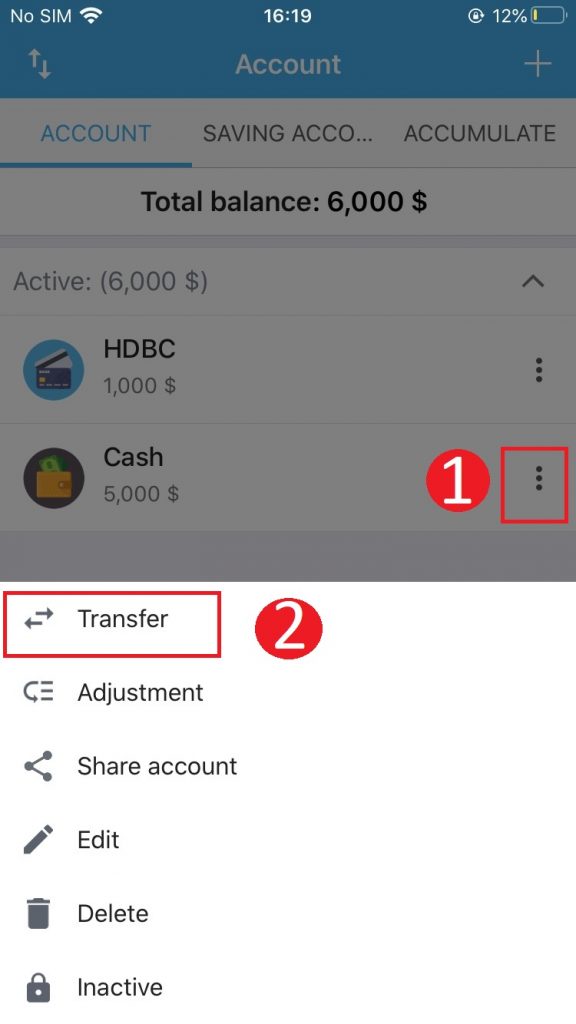
Step 1: Click the 3 dot button next to the account you want to transfer.

Step 2: Click  Transfer

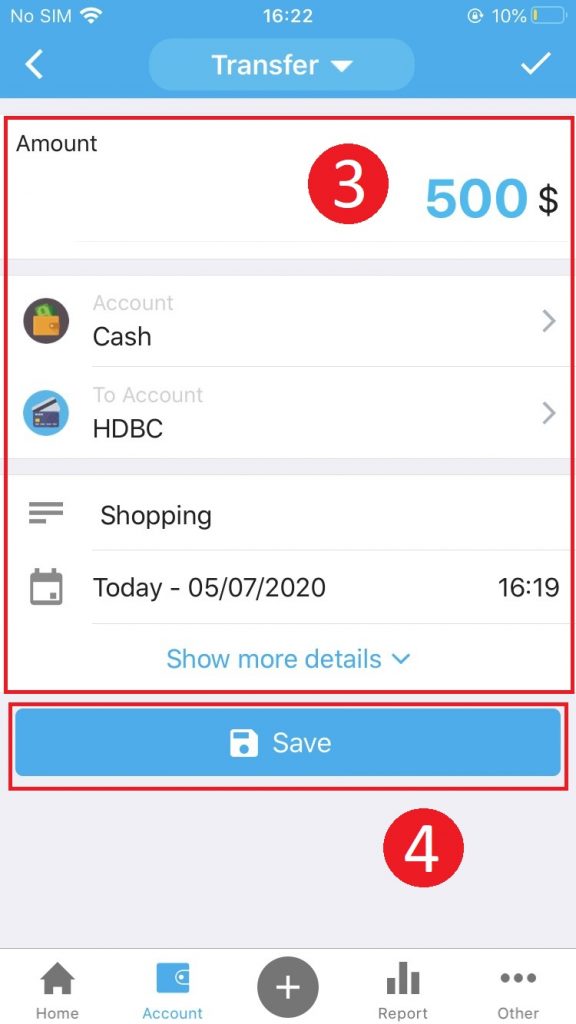
Step 3: Fill out the transfer information

  • Enter Amount
  • Select the account you want to move to
  • Interpretation: The reason for the transfer may be recorded
  • Go to Show more details to enter Transfer Fee (if any)

Step 4: Click  Save
This entry was posted in Account management. Bookmark the permalink.
Anh Tuan Nguyen

Install the Money Keeper application
How to upgrade your account in coins?
  • Bắt đầu sử dụng
  • Hướng dẫn sử dụng
  • Câu hỏi thường gặp
  • English
    • English
    • Tiếng Việt