Skip to content
MISA Help MoneyKeeperMISA Help MoneyKeeper
  • Bắt đầu sử dụng
  • Hướng dẫn sử dụng
  • Câu hỏi thường gặp
  • English
    • English
    • Tiếng Việt
Frequently asked questions

Change Password

Posted on 27/05/202003/06/2020 by
Post Views: 1,356

To change your password, please follow the instructions below

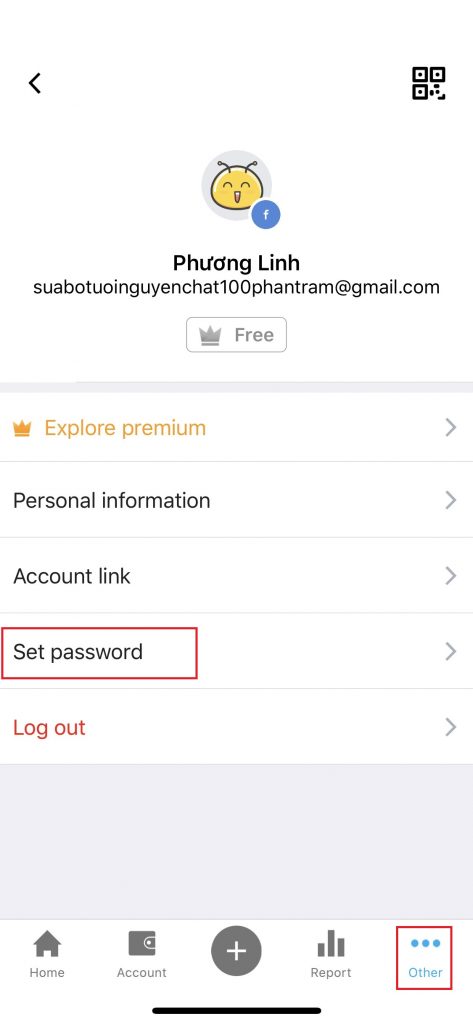
Step 1: Go to the Other tab, in the Personal Information section, click on the email address.

Step 2: Click Set password

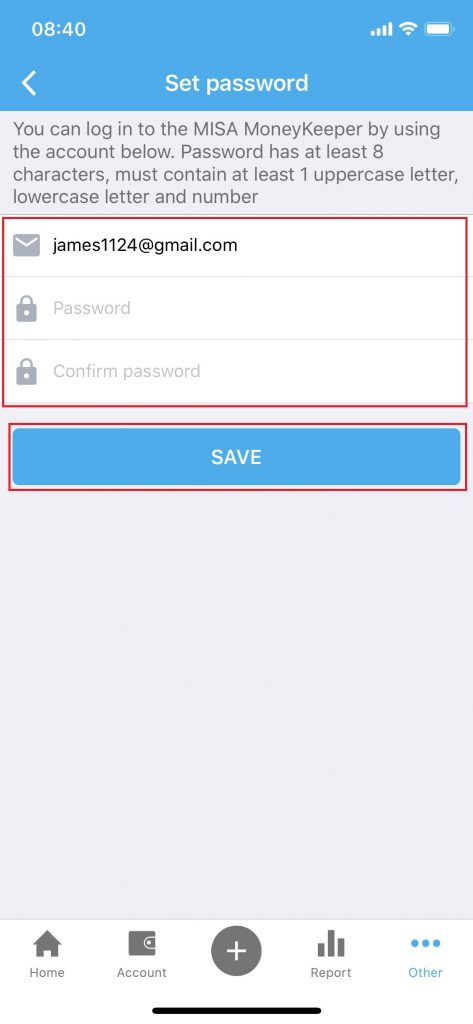
Step 3: Declare email, new password and confirm new password. Click Save to finish
This entry was posted in Frequently asked questions. Bookmark the permalink.

Record the revenues
Set spending limit on application
Recent Posts
  • Group Fund
  • Recording Expense Transactions
  • Manage Accounts in MISA MoneyKeeper
  • Income and Expense Categories
  • Set Spending Limits in the MISA MoneyKeeper App
Categories
  • Frequently asked questions (20)
  • Expenditure management (11)
  • Getting Started (7)
  • New feature (7)
  • Account management (6)
  • Kiểm tra tài chính hiện tại
  • Home
  • Frequently asked questions
  • About Us

Copyright 2014 – 2020 MISA JSC   |   Term of use   |   Privacy Policy

Address: MISA JSC, 9th Floor, TechnoSoft Building, B1D Lot, Duy Tan, Cau Giay, Ha Noi

Web: www.misa.com.vnPhone number: 024 3795 9595 Fax: 024 3795 8088

Business license: 0101243150 - Date: 24/04/2002, modified at 23/07/2018

Granting agencies: Business Registration Division - Ha Noi Department of Planning and Investment

Free download app

Kiểm tra tài chính hiện tại

  • Bắt đầu sử dụng
  • Hướng dẫn sử dụng
  • Câu hỏi thường gặp
  • English
    • English
    • Tiếng Việt